

Understanding and Fixing HC/HE Error on Samsung Dryers
If you own a Samsung dryer, encountering an “HC” or “HE” error can be frustrating. These codes indicate an issue with the dryer’s heating system, meaning the dryer is either overheating or not heating at all. In this article, we’ll help you understand what causes the HC/HE error and guide you through the steps to troubleshoot and repair the issue.
What Does the HC/HE Error Mean?
-
HC (Heating Error) – The dryer detected unsafe high temperature.
-
HE (Heating Element Error) – The heating element is not working as expected.
These problems often come from faulty components or airflow restrictions.
Common Causes of the HC/HE Error:
1. Burned-Out Heating Element
If the element is cracked or burnt, your dryer can’t generate heat.
Example: In Memorial, Houston, we replaced a burned heating element on model DV45K6500EV/A3 after the dryer stopped heating completely.
2. Faulty Thermistor or Thermostat
These parts read and control temperature. A failing sensor can cause overheating or prevent heating entirely.
3. Power Supply Issues
Dryers need a steady 240V supply. A loose plug or a half-tripped breaker can trigger these error codes.
4. Blocked Dryer Vent or Poor Airflow
One of the most common issues. We recently helped a Katy homeowner whose vent duct was 90% blocked, causing repeated HC errors.
5. Wiring or Control Board Faults
Damaged wires or a defective control board relay can prevent proper temperature control.
Steps to Repair the HC/HE Error on a Samsung Dryer
1. Check the Power Supply
- Ensure your dryer is connected to a 240V power outlet. Low voltage can cause heating problems. Reset the power or check your breaker panel for any tripped circuits.
2. Inspect the Heating Element
- Disconnect the dryer from power.
- Access the heating element (usually located in the back panel or beneath the drum).
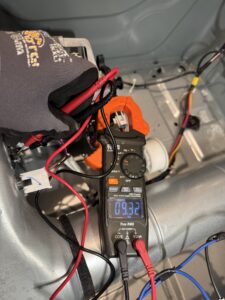
- Use a multimeter to check for continuity. If the heating element shows no continuity, it’s defective and needs to be replaced.
3. Test the Thermistor and Thermostat
- These components regulate temperature inside the dryer. A faulty thermistor or thermostat can cause the dryer to overheat or underheat.

- Use a multimeter to check for proper continuity. Replace any component that doesn’t pass the continuity test.

Why the Thermistor Fails (Real Case in Katy)
One of the main causes of a failed thermistor in Samsung dryers is a partially clogged vent duct.
This does not mean a total blockage. Lint slowly coats the inner walls of the vent.
In winter, hot, moist air from the dryer meets cold outside air near the vent outlet.
Moisture condenses on the lint-coated walls and can run back toward the dryer by gravity.
The thermistor sits in a small glass capsule and operates at high temperature.
Even tiny water droplets reaching that hot glass element can damage it over time.
This often leads to the Samsung dryer HE error code (HC/HE).
-
-
- Scenario 1 — Code shows: The dryer posts HC/HE and stops or limits heat.
- Scenario 2 — No code: The dryer keeps running but overheats internally.
- Next safeguard: The thermal fuse on the blower housing opens to prevent a fire risk.
-
Once the thermal fuse blows, the control panel still lights and you can pick cycles, but the drum will not start.
At that point, the correct repair is to replace the thermistor and the thermal fuse together and restore proper airflow.
Prevention tip: Clean the full vent path from the dryer to the exterior cap.
Verify the exterior flap opens freely.
In cold months, pay special attention to long runs and elbows where condensation can form on lint.
Good airflow protects heat sensors and keeps drying times normal.
4. Check the Venting System
-
-
- Poor airflow or a clogged dryer vent can cause the dryer to overheat, triggering the HC/HE error.
- Clean the dryer’s lint filter, and check the vent hose for blockages. Make sure the vent is clear and allows proper airflow.
-
5. Inspect Wiring and Connections
- Examine the wiring connected to the heating element, thermostat, and control board. Look for any loose, frayed, or damaged wires and fix them as needed.
6. Replace the Control Board (if necessary)
- If all components are functioning properly, but the error persists, the issue could be with the dryer’s control board.
- Replacing the control board should be a last resort, and it’s recommended to contact a professional technician for this task.
How to reset HC error on a Samsung dryer
This is a common question, but unfortunately, there’s no simple reset that will fix the root of the problem. Yes, you can try unplugging the dryer for a few minutes and turning it back on. In rare cases, the error might disappear temporarily. But in 99% of real cases, the issue comes from a faulty temperature sensor. Over time, the sensor drifts from its original resistance range. When the dryer powers up, the control board checks the sensor resistance — if it’s outside the expected limits, the board immediately triggers the HC error. That’s why searching online for how to reset the HC code usually leads nowhere. It’s better to call a technician right away — or even better, contact our team at HomeFix Appliance Repair. We’ll find and fix the real cause, not just the symptom.

How to Prevent Future HC/HE Errors
- Clean the Vent Every 6 Months: Good airflow prevents overheating.
- Check Electrical Connections: Loose or overheated plugs can cause voltage drops.
- Annual Inspection: Have a technician check the heater and sensors for wear.
When to Call a Professional
DIY repairs can help in some cases, but if the error returns after troubleshooting, it’s safer to call an experienced technician. Working with 240V dryers involves risk, and control board repairs require experience.
In Houston, Katy, Fulshear, Memorial, and Sugar Land, HomeFix Appliance Repair handles these issues almost every week. We carry original Samsung parts and can usually fix the problem on the first visit.
Need Help?
If your Samsung dryer keeps showing HC or HE, or isn’t heating properly, contact HomeFix Appliance Repair.
-
Fast same-day service in most areas.
-
Experienced with Samsung DV and DVE series dryers.
-
We handle everything—from clogged vents to control board replacements.
Call today and schedule your repair. Let us take care of the error so your dryer works like new again.
FAQ – Samsung Dryer HC/HE Error
What does the HC error mean on my Samsung dryer?
The HC error indicates the dryer is overheating. This is often caused by a blocked vent, faulty temperature sensor, or wiring issue.
What does the HE error mean on my Samsung dryer?
The HE error usually points to a problem with the heating element or temperature control system, often resulting in no heat output.
Can I reset the HC error on my Samsung dryer?
Unplugging the dryer for a few minutes can clear the code temporarily, but it does not solve the underlying issue. If the error returns, the sensor or heating system needs inspection.
Is it safe to use the dryer with an HC or HE error?
No, it’s not safe. These errors indicate overheating or failed heating components, which may pose a fire risk.
How can I prevent HC/HE errors in the future?
Clean the lint filter after each load, check the vent system every six months, and schedule annual maintenance to keep the dryer operating safely.
Who should I call if my Samsung dryer keeps showing HC/HE error codes?
Contact HomeFix Appliance Repair if you’re in Houston, Katy, Sugar Land, Fulshear, or Memorial. Our experienced technicians can quickly diagnose and fix Samsung dryer issues.


4 Responses
Thanks for reading! Just a quick update based on what we’ve been seeing in the field lately. The HE (Heating Error) code on Samsung dryers doesn’t always mean a bad heating element — in many cases, it’s caused by restricted airflow, clogged vents, or a blown thermal fuse.
We’ve had several recent service calls in Katy, Sugar Land, and Richmond where the root cause was poor venting or overheating. If you’re seeing the HE code repeatedly, it’s best to get it checked before it damages other components.
Feel free to call us at 346-489-7171 — our techs serve Houston, Memorial, Bunker Hill Village, and nearby areas with same-day service available.
Great article! I was getting the HE error on my Samsung dryer and had no idea what it meant. This guide explained everything clearly and helped me understand what could be wrong. I checked the heating element and found it was burnt out—just like the article suggested. Thanks to this post, I saved time and knew exactly what to tell my technician. Highly recommend for anyone dealing with this error.
I found this article really helpful. My Samsung dryer stopped heating and showed an HC error—I had no clue what it meant. The explanation was clear and easy to follow. I checked the thermostat and found a loose wire, just like one of the causes mentioned. After fixing it, the dryer worked again. Great job with this post!
I was getting the HC error on my Samsung dryer and thought I’d need to replace the whole board or call in a technician. After reading your article, I decided to take a chance and ordered a full set of temperature sensors from Amazon for under $30. Swapped them out myself in under an hour — and boom, the dryer started working like new again! You guys saved me a ton of money. Huge thanks for the clear explanation and honest advice.